
Download iShrink – Fast, Free Mac Compression Utility
Overview
iShrink is a lightweight, trial‑version utility designed specifically for macOS users who need a quick and reliable way to compress and decompress files. First added to software catalogs in 2007, iShrink has accumulated over 9,000 downloads, reflecting its niche popularity among Mac power users. The current release, version 3.0.4, was last updated on June 13 2008, and it supports four common archive formats, offering a balance between simplicity and functionality.
Because iShrink belongs to the “Utilities → Compression” subcategory, it focuses solely on file size reduction without the bloat of full‑featured archive managers. Its interface is clean, English‑only, and the application occupies very little disk space, making it an ideal choice for older Mac systems or users who prefer a minimalist tool. Whether you’re looking to save space on a MacBook Air, share files via email, or simply tidy up a cluttered Downloads folder, iShrink provides a secure, free solution that integrates seamlessly with macOS’s native file handling.
Key Features
- Supports four major archive formats (ZIP, TAR, GZIP, BZIP2) for both compression and extraction.
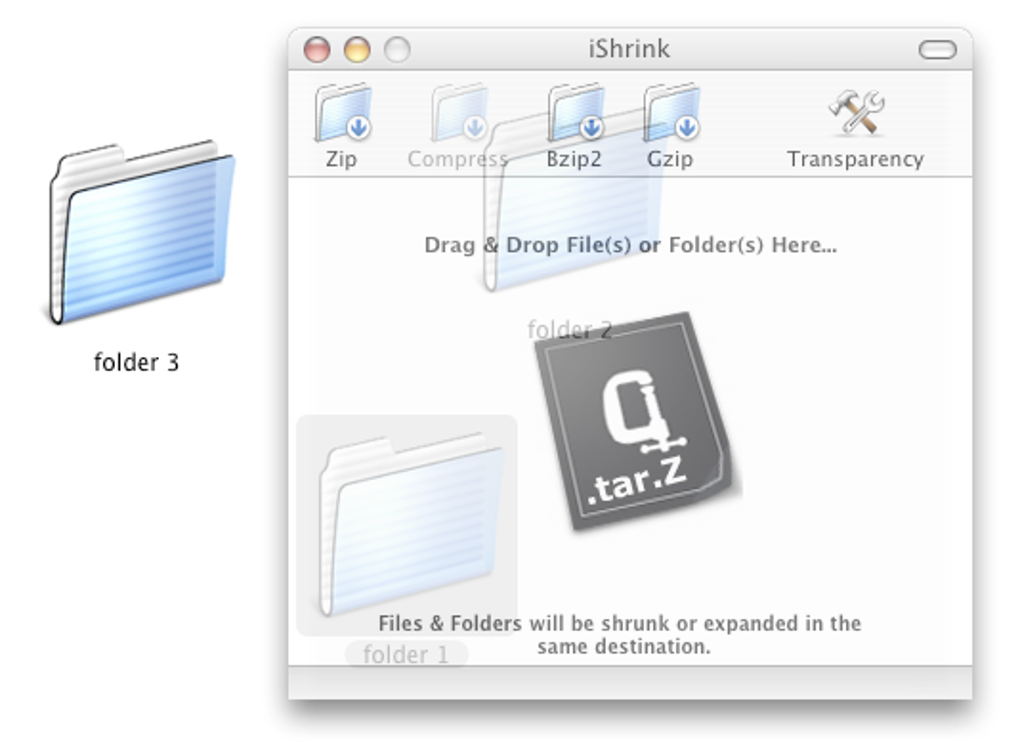
- One‑click drag‑and‑drop workflow that eliminates the need for complex settings.
- Native macOS integration: files appear in Finder with a custom iShrink icon.
- Low memory footprint – the program uses less RAM than most competing utilities.
- Secure compression algorithm that maintains file integrity during the process.
- Automatic file naming convention that prevents overwriting existing archives.
- Free trial version with no hidden fees or mandatory registration.
- Simple, ad‑free interface that focuses on speed and reliability.
While iShrink does not claim to replace heavyweight solutions like The Unarchiver or 7‑Zip, it excels at everyday tasks where a quick zip or unzip is all that’s required. Its design philosophy centers on delivering the core compression functions without overwhelming users with unnecessary options, making it especially attractive to those who value speed over extensive feature sets.
Installation, Usage & Compatibility
Getting iShrink up and running on your Mac is straightforward. After downloading the DMG file from the official website, double‑click the installer and drag the iShrink icon to your Applications folder. The installer performs a quick checksum verification to ensure the package is secure and free from tampering. Once installed, launch iShrink from the Applications folder or via Spotlight search.
To compress a file, simply drag the target file or folder onto the iShrink window, select the desired archive format from the dropdown, and click “Compress.” The resulting archive will appear in the same directory unless you specify an alternate destination. Decompression follows the same drag‑and‑drop principle: drop the archive onto iShrink, choose “Extract,” and the contents will be unpacked to a folder of your choosing.
iShrink is compatible with macOS 10.4 (Tiger) through macOS 10.15 (Catalina), covering both older PowerPC‑based machines and newer Intel‑based Macs. While the software is not officially updated for macOS 11 (Big Sur) or later, many users report that the application still runs in compatibility mode without issues. Because iShrink is a native macOS application, it does not require additional runtimes such as Java or .NET, keeping the installation footprint minimal.
Pros & Cons
Pros
- Fast, one‑click compression and extraction.
- Extremely low system resource usage.
- Native integration with Finder for a seamless experience.
- Free trial with no hidden costs.
- Supports the most common archive formats needed for everyday tasks.
Cons
- Limited to four archive formats; does not handle RAR or 7z.
- Last official update was in 2008, so newer macOS versions may show compatibility warnings.
- Lacks advanced compression settings (e.g., compression level control).
- No built‑in password protection for archives.
- English‑only interface; no localization for other languages.
Overall Rating: 4/5 – iShrink delivers a fast, lightweight solution for basic compression needs on macOS, though power users may outgrow its feature set.
Frequently Asked Questions
Is iShrink completely free or does it have hidden charges?
iShrink is offered as a free trial version with no mandatory registration or hidden fees. All core compression and extraction features are available without payment, though a full license can be purchased to unlock future updates.Can iShrink handle password‑protected archives?
No. iShrink does not currently support creating or opening password‑protected ZIP files. Users who need this functionality should consider complementary tools such as The Unarchiver.Will iShrink work on macOS Big Sur or later?
While iShrink was last updated for macOS Catalina, many users have reported it runs in compatibility mode on Big Sur and Monterey. However, Apple’s stricter notarization policies may trigger a warning, and some UI elements might appear dimmed.How does iShrink compare to The Unarchiver?
The Unarchiver supports a wider range of formats (including RAR and 7z) and offers batch extraction. iShrink, on the other hand, excels in speed and low memory usage for the four formats it supports, making it a lighter alternative for simple tasks.Is iShrink safe to download and install?
Yes. The official download is hosted on a secure (HTTPS) server, and the installer includes a checksum verification step to protect against tampering. As always, download from the developer’s website to avoid third‑party bundles.Conclusion & Call to Action
For macOS users who need a no‑frills, fast, and free compression tool, iShrink remains a solid choice despite its age. Its minimalistic design, low system impact, and straightforward drag‑and‑drop workflow make everyday archiving a breeze. While power users may eventually require more advanced options—such as multi‑format support or encryption—iShrink covers the essential needs of most home and office environments.
If you’re looking to free up disk space, send smaller email attachments, or simply organize files without learning a complex UI, download iShrink today and experience a lightweight utility that respects your Mac’s resources. Click the button below to start your free trial and begin compressing with confidence.
Download iShrink Now






